Buy the AYN Thor here: https://joeysrh.link/AYN_THOR
What is the AYN Thor?
It’s not often that we get a new retro handheld that can quite literally change the way we play games.
But that really is what the AYN Thor is – a new form factor, new style of handheld that we just have not seen before outside of original hardware and done mostly, right.
Dual screen retro handhelds is something the community has asked for many times, and now, it’s here and it’s kind of awesome.
The AYN Thor is a game changer
Back to the Thor, we can start off strong here – there is simply no better way right now to play DS and 3DS games, emulated, on any other device. This really is the best of the best.
There’s a few things here that are exciting and the reason I’m saying that.
First, there’s dual OLED screen’s – AMOLED on both if we go by AYN’s spec sheet.
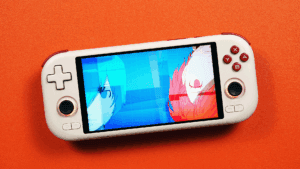
The top is a 6” 120hz 1080p 16:9 OLED screen and honestly, it’s crisp and it’s gorgeous. I’m a massive fan of it.
On the bottom, we have a 3.92” 1240×1080 60hz 31:27 OLED screen, same as the one in the Retroid Pocket Classic and Retroid Pocket Mini V2 for those that have that.
This blend of screens is honestly great from my perspective. You get the ability to have big screen 3DS gaming, keeping the aspect ratio and blowing up the top screen and you have a sizable, usable bottom screen.
It’s the exact same scenario for DS games. As you’d expect, awesome ways to play these games.
Now, you can of course shrink the top screens, keeping the aspect ratio and basically copying the bottom screen size if you want and there’s games where you’d want to do that for, but mostly, I prefer keeping the top big.
Obviously, 3DS and DS isn’t the only systems you can play on here – I’d argue this is probably the most complete handheld on the market right now because of the dual screens and because there isn’t a system that you can’t play well here.
You can play Game Boy and Game Boy Color beautifully on the bottom, if you wanted, or you can jump to the top and play PSP using the 16:9 display up there. You can load up some GameCube or PlayStation 2 on either screen and enjoy that, or you can play some Switch too.
Then of course there’s Android games and hey if you wanted to just leave Runescape on the bottom and play some Destiny at top, you can do so.
You have one of the best devices on the market for streaming too using Artemis or any other streaming service, and just throw up whatever on the second screen.
The dual displays are beneficial for way more than just for 3DS and DS, they enable you to stop caring about the right aspect ratios for things because either screen can work for basically everything.
And I guess that feeds right into performance, there is a Snapdragon 8 Gen 2 powering the AYN Thor – the exact same processor that AYN has used in the Odin 2, Odin 2 Mini and Odin 2 Portal so needless to say, over the last two years, this processor has been documented thoroughly for what it can do.
I received a lot of questions from people over the last week that didn’t know this, so for their sake, let me help you with what this can play.
The answer is, basically everything. Outside of games that just don’t emulate well, all of PlayStation 2, GameCube, Wii, 3DS, PSP, and so on can be emulated, upscaled and very well. Then you can open the can of worms and play some Switch if you want to, or GameHub and Winlator if that’s your speed. We’ll talk more about this later. Then of course there’s Android games, and so much more.
Pricing & models
The price for all of this? Well, it starts at $299 US dollars for the version with the Snapdragon 8 Gen 2 that has the performance we’re talking about above, with all that power and everything. It’ll come with 8GB of RAM and 128GB of storage.
Then the next step up is the Pro model at $349, 12GB of RAM, 256GB of storage and this tier also opens us up to extra colors, white, rainbow and purple. The Pro model is the model that I have here today for the review.
Lastly, we have the Max model at $429 with 16GB of RAM and 1TB of storage and also the extra colors once again. The $299 tier is black only.
There is another version, the Lite that offers a Snapdragon 865 processor as the main difference, for $249 US dollars, however the processor is slower, the storage speed is slower, the WiFi is WiFi 6 instead of 7 and it can only output 1080p over video out. I don’t think this model is worth talking much about, and I also don’t have this model for review, but there is one single use case for this model and that’s if you really only care about DS and 3DS.
So just to be clear, if your limit for this device is just DS and 3DS and you do not care about the world of other things this can do, I can see the Lite being a good option, but at a $50 difference, for how much more powerful the Snapdragon 8 Gen 2 is, it’s basically a no brainer in every scenario.
Now, the question everyone is going to ask is, is 8GB of RAM enough for the $299 model? The answer is complicated. Yes, it’s enough from the perspective that you can play everything you want on it just fine, but the bigger limitation is the internal storage in my opinion.
128GB of storage space is rough, especially on Android where Android games like Genshin Impact, Zenless Zone Zero and so on can be 30GB each in space. There’s also the part where GameCube/Wii and PS2 HD texture packs can only be installed to the internal storage as well, so you can eat up 128GB really quickly. To be clear, none of this can be moved to your SD card, which is why 128GB is so limiting. There’s a few other reasons, but those are the major ones.
That being said, if you don’t play Android games and don’t care about HD texture packs, none of this will matter so grab the $299 model if you want. But I think the best sweet spot is the 12GB RAM option, however if you plan on buying a separate 1TB SD card, it’s actually cheaper to just go Max given the price difference is basically the cost of a 1TB card.
That’s what I personally purchased, Max White 1TB.
There is also an Accessory pack or you can buy the accessories individually. I was not sent any for review so I can’t talk about them and if they’re worth it, but we will discuss the grip later.
Controls
Let’s jump in and do a tour of the handheld, so you can get an idea of the controls and ergonomics.
We have a stick top layout here, and the sticks are grippy textured caps, hall effect and going to be honest – better than I expected for inset sticks like this. I found them to be quite capable in most situations, however I would not wish playing Call of Duty on this device on my worst enemy.
I have reviewed a lot of devices over the years, this may be the most uncomfortable for something like Call of Duty that I’ve personally ever experienced. Not due to the sticks, but the overall ergonomics of the device which we’ll talk about in a bit. For emulation and most other use cases, it has been fine, but as you can imagine – a device like this will have ergonomic compromises.
Dpad is bottom here, my personal preferred layout, and it’s a slightly smaller dpad than the Odin 2 Portal’s and more in-line with a Retroid size or Odin 2 original size – I don’t have them on hand to confirm, but you get the idea.
This dpad is great though, accurate, loose enough, great pivot – AYN makes awesome dpads, and it’s a similar feeling here that I’m a personal big fan of. I played and beat Metal Slug 7 on Friday using this dpad just fine and it felt good to me. I’ve played and gone through a bunch of other games, and for my uses, it felt natural.
On the opposite side, with the buttons, they’re a great size and very silent. There is barely any noise coming from these at all, very muted, tactile feeling and nice travel. However, my unit here does have a problem with the A button sticking – I do not know if it’s a problem with all units or just mine, but it sticks often and would be a deal breaker to me personally on a retail unit if it is not just mine.
I do imagine this is a quality control problem with mine alone, but I cannot confirm that. I will have to wait for my retail version to arrive to do so, and I’ll likely do a re-review at that point.
Buttons, shoulders & triggers
The buttons all along the sides are start and select at the top and home bottom left, back bottom right. We also have an AYN button here at the bottom that we’ll talk about later.
On the back is some very loud shoulder buttons, super clicky, but they stick out nicely and are easily accessible.
Then we get to the triggers and we have the biggest blunder of the device in my opinion and it’s the shape and design of them. The triggers are flat, boxy and even slightly raised with the highest point being the edge of the device. That leads to your hands being in an extremely uncomfortable position when utilizing the triggers. This all goes back to my experience playing something like Call of Duty or a shooter. Instead of feeling the actual trigger, you are feeling the absolute edge of it and it’s an absolute shame to experience.
To the point where I have personally remapped everything that I can off of the triggers to the shoulders instead, to avoid using them. There is just no good way to say this, or sugar coat it, the triggers and design are awful and ruin what is otherwise an absolutely fantastic device.
The first person that can fix the triggers and curve them as they should have been as a mod is going to make a lot of money.
Video out
Continuing our tour and on the front bottom, we have volume controls, power button, USB-C charging, headphone jack and SD card slot.
Along with charging, the USB C port is also used for external video out and currently, it can only output the top screen. I don’t see that as being an issue personally, but it’s something to be aware of. You also have a few resolution and frame rate settings to choose to output docked.
Now on that topic, the top screen will turn off during video out if you enable that in the software, but the bottom screen does not. If you close the lid, video out no longer works. Both of these are issues and hopefully something that can be address via an update in the future, but as always, don’t buy based on potential. I wouldn’t say this is a good docked experience currently and hope they fix it.
Then on the back, we have our fan intake, and the exhaust grills above. You have to be a bit careful here with the fan intake on the back because if you set this down on any surface like a pillow or so on, you could block the intake and heat up the device. Something I did often by accident while testing.
Comfort thoughts
So if we look at this entire package from a comfort perspective, it’s hard to nail this down. On the one hand, for stick games, I’ve been very happy with it, mostly comfortable and if I don’t have to use the triggers, I’m happy. For dpad gaming, I don’t see anything here that would persuade anyone that has fears about dpad bottom being comfortable. For my personal usage, I can play dpad games just fine, hands flared out and while obviously not a perfect experience, it’s fine enough for me and I personally prefer this over dpad top. However, I think this will be a point of contention for many.
AYN does sell a grip for the device, I wish I had one with my review unit to test out and report back on how or if it solves my gripes with the triggers or any comfort changes, but that will have to wait for my retail unit.
I will say, without seeing the grip, I believe a grip will be necessary for long time gaming on this device. I do not think this will be comfortable, as-is without it. Just my personal opinion on this.
Hinge thoughts
Now, I can’t talk about comfort without talking about the hinge. I want to be clear, I can’t talk about hinge reliability because I don’t have the power to see into the future – the Retroid Pocket Flip 2 took five months to show hinge issues, the Miyoo Mini Flip showed them instantly, and the Retroid Pocket Flip 1 took a bit as well. There isn’t much I can do on my end to test a hinge.
This is a better 2DS
That being said, I’m not a big fan of the fact that it locks you into spots. You basically have three angles that the hinge sticks to, and I wish we had full control because none of the three angles is how I usually want to play looking at the screen.
The saving grace of the Thor is with the OLED screens viewing angles, it helps negate this a bit, but I am still finding my wrists bending forward more than I want them to be because I can’t set the hinge to the spot I want to.
All of that being said, it was late Friday night when I discovered my favorite way to use this device is like a 2DS. I opened the hinge all the way, and played through multiple games and this easily became my favorite way to use this device. Not only is it vastly more comfortable, but it funnily becomes easier to use the bottom screen as a real single screen handheld where the top is now like an extra monitor that you can use, or the complete alternative with using the top as a screen and bottom as anything else.
I might have said this is a great DS and 3DS device in the past, but honestly? To me, it works best as a 2DS. We’ll see if using a grip with this changes that.
That being said, these are workarounds. I really wish the hinge was able to be set where we want it, or at the very least, there needed to be a notch in between the last two options.
Closing the lid & exterior design
Closing the device is as you’d expect, pretty satisfying, nice click to it and mostly, this works. I have run into a number of times where I close the device, and it’s still on. I’ve had to keep an eye on it, as I’m not sure why it doesn’t sleep sometimes. However, when it does work and does sleep, it stays asleep and when I open it up, I’m right back into whatever I was playing, nice and easy and how you’d expect and want a clamshell device to work.
It is faint, but there will be minor impressions of the two circles at the bottom on the top of the screen – never really been an issue, wipes off, but those are the two spots that hold the screen.
This does mean, there’s wide open space if you look at this from the side. Normally, I wouldn’t be concerned, but the top of the device can flex heavily. To the point where, I’m a little worried about having this squeezed that it may break something. I do tend to just throw clamshells into my sling bag, like where my Retroid Pocket Flip lives right now, and so if my bag were to squish, I have a bit of fear about what might happen to this. I do wish they had made this more solid as it does take a bit away from the premium aspect, which shines when you actually see the inside of the device.
For anyone that has a Retroid Pocket Flip 2, I actually feel like this has more flex than even that does and I don’t think that’s a good thing at all.
This does have quite a bit of creak like this and honestly the flexing is just scary for a device where clamshell should mean protection, and I get the opposite feeling here.
This is a weird tale of two devices because I truly feel the outside design of the device counters how absolutely awesome the inside of the device is.
Screens
We talked about the screens, but the dual OLED screens really is something you have to see in person to understand how awesome it makes DS and 3DS look, especially this new 6” top screen which I find to just be absolutely gorgeous.
Now on the screen topic, it’s important to mention that by default, the top screen is 120hz while the bottom screen is 60hz. Well, that’s the specs of the actual screens, but not what you’re getting in reality. You can enable 120hz mode which does turn bother screens to 120hz, but because the bottom screen is only 60hz capable, they are using a level of frameskip or other hack to get the 60hz bottom screen to display 120hz.
This does mean that you will see tearing or screen waving on the bottom screen in 120hz mode for any fast paced gameplay. The other option is setting both displays to 60hz, if you want them both on.
Otherwise, you can just turn off the bottom screen to have the top screen on only and at 120hz.
That being said, despite any filming I’ve had to do for review, I have personally been in 120hz mode with both screens on for almost all my gaming because of the response time benefits and how smooth 120hz is, but there are some times and games where I will turn on 60hz mode for the bottom for games like Contra 4, or Sonic Rush or games that utilize the second screen for something fast paced.
Long story short, you have options and it’s great. You can of course completely turn off either screen in the software as well.
Brightness issues
You also have access to brightness controls for both screens or either screen, however the control for both screens right now does not brightness match and because the bottom screen appears to be brighter, it currently means that you have to actually adjust the screens individually yourself rather than use the dual screen slider. Hopefully something they can adjust in the software because this is something that really needs to exist, adjusting brightness multiple times throughout the day got old really fast.
There’s also a bug where the brightness of the bottom screen resets when you sleep the device, which has also been pretty annoying – you basically have to try and retap the slider at the spot you have it to get it to reapply.
Speakers & Audio
Let’s jump into the audio and this is where I was pleasantly surprised. The speakers, sound great to me, but they do lack a little bit of bass so I do imagine that anyone that wants a more punchy bass sound, will likely want to use a script to improve the EQ on them, but I think they’re more than good as a base line.
I have run into a few bugs with sound though where it will just not adjust sometimes, and you’d set it to the lowest, and it would still sound super high. Hard for me to reproduce, but something I’ve run into often and reported to AYN with the hopes that they can fix it.
And since we’re here on the topic of audio, I had a bit of fun with the built-in microphone playing Nintendogs. I named my dog after my wife, and was howling while playing because the game wants you to speak commands so I had to sleep on the couch this weekend, but extremely worth it because it was so much fun to play Nintendogs after all these years using the built in mic of the device which worked more than fine for this purpose.
I also tested it using Discord voice chat, and worked great there too, so the possibilities are endless here for microphone usage.
Fan noise & heat
On the topic of fan noise, I’ve kept it on Smart fan for my entire time and it’s been silent when it needs to be, and not loud or noisy when it needs to ramp up. This is a complete difference from the Retroid Pocket Flip 2 for example where the fan was just a disappointment even on Quiet – AYN really solved and figured out the fan noise here.
With fan noise, we have to talk about thermals and throughout my gaming, the device can get warm, but not hot. It will get hot if you happen to charge the device while playing, but I didn’t have issues with heat outside of that. I will point out, that the right side of the bottom screen where the screens ribbon cable is does get significantly warmer or hotter than the other parts and can be uncomfortable if you’re using your finger to tap on that side for DS and 3DS while charging.
Battery life
Let’s talk battery life now. I did a large number of battery tests where I could, and basically, we have the normal Android 24 hour sleep drain of about 2-4% loss. Charging is hard to measure, but it’s pretty quick up to 80%, and then slower after as usual, I’d say it’s about an hour to hour and a half maximum as this does have 27w charging.
But then we get to gaming, and for 8x resolution DS gaming and 4x 3DS gaming, it’s roughly 6 hours of battery at max brightness both screens, performance mode, smart fan, 10% audio, LEDs on and WiFi on. Surprisingly, got the same numbers with 120hz mode enabled as well.
I then did another quick test with both screens at 50% brightness, and saw just under 10 hours of battery life which is just fantastic and likely more around normal usage considering I don’t think many people will have brightness maxed.
I did the same test with Nintendo Switch, using Breath of the Wild as the game, and it was right about 4 hours of battery life, which is surprisingly good. The bottom screen was still on, but just showing the Thor Control Center.
Long story short, battery isn’t a concern or at least not to me with the time I’ve had the device.
Software
Let’s talk software now and you have the usual Android pull down menu at the top, with performance modes of standard, performance and high performance. Personally, I stick to Standard or Performance as high performance is rarely needed, we have the Fan profiles or Quiet, Smart and Strong of which I just leave on Smart and stop caring about it, we have the LED control to change the colors or turn them off, you can change the button layout from Nintendo to Xbox to off, you can adjust the triggers to digital or analog but both can just be left on, there’s the ability to change the 60hz to 120hz here and then we have charging separation.
This helps to charge the device, instead of the battery, so it will stop charging the battery when it’s on and lowers the heat generated while charging and it’s great to enable while docked.
Then you have Bluetooth of course and yes you can connect Bluetooth controllers and use them, as well as the usual Android other settings. One thing to point out is Floating icon which is on by default and shows as a while line on the right side, if you tap the arrow you can turn it off to be transparent and when you swipe in from the right, you get an extra menu in games.
Key adapter is for on-screen button mapping, but also at the bottom, you can set per-app settings for controller layout so maybe you want Xbox layout for Streaming apps, maybe you want normal mode for streaming apps, and so on – customize the three bottom options on a per-app basis. Lastly, heading into Android settings, Thor settings and there’s more you can do. Vibration strength, set your video output mode, settings to do with that, you can map the Back key to something else, and so on.
Now, there are even more options for dual screens. For instance, if you tap and hold on an app you can choose where to launch it, global, internal which is top, or external which is bottom. The basic idea though, is whichever screen you touch, is where the app will load. So if you tap the app on the bottom screen, it loads bottom, tap top, loads top – you tap where you want to play or use the controls.
But then we also have the Thor Control Center activated by the AYN button at the bottom.
On the Settings page, you can enable or disable 120hz 60hz mode. But then you have all the same toggle that we saw in the swipe down menu here as well. But there’s one more and that’s Auto-lock. Auto lock is awesome, you can set it to auto, top or bottom and this locks where your actual controls work. So for example, if you have a game top and walkthrough bottom, you set this to auto lock top so that when you use your finger to scroll the walkthrough, you don’t accidentally push a button and exit the walkthrough. Or vice versa. This is insanely useful.
The software honestly gives me pretty much everything I need and I’ve been very happy with it.
Streaming
Now on the topic of Apollo and Artemis streaming, the AYN Thor matches my AYN Odin 2 Portal for streaming, same processor, same WiFi 7, pretty much the same except and this may just be my network, but where my Portal has some weird issue with not always matching incoming and rendering frame rates, the Thor has been perfect on that front. So from an actual data point, the Thor is better for streaming than my Odin 2 Portal. This changes when we take into account ergonomics, comfort and so on, but I thought it was interesting and exciting.
I should also point out that yes GeForce Now works just fine on here and without issue, controls are recognized and so on. This also goes for Xbox and PlayStation streaming apps too. Outside of Snapdragon 8 Elite devices, this would be one of the better Android devices for streaming to get that I’ve personally tested.
PS1 & Under
And so the last topic of the day is performance.
We talked about it before, this processor is well documented and you likely could find any game you want by looking up any Odin 2 device and your game name through Google, but let’s run through.
From PlayStation 1 and under, there’s of course no problems here and upscaled. Either screen can be used depending on your preference. I’m not allergic to black bars so I just use the top screen for everything, but you can throw these systems onto either screen and enjoy them.
N64, Dreamcast & PSP
Nintendo 64, Sega Dreamcast and PSP and so on are all the same – no issues playing any single game from those systems.
PSP obviously works the best on the top screen because of 16:9, and you can upscale it as much as you want – fantastic device for PSP.
Nintendo DS & 3DS
Then we get to Nintendo DS and 3DS. I did an entire showcase of 3DS games that you can check out and outside of a small handful of games, which from the comments on that video can actually be fixed, this is the quintessential DS and 3DS games experience. I’ve set DS to 8x upscaled, 3DS to 4x upscaled, and you know that it’s an awesome experience when you forget you’re emulating and you’re just invested in the game.
For example, I tried and failed hard at playing Trauma center – using the stylus, game is hard as hell, but I was loving it. Same thing with Nintendogs, such an enjoyable experience. Tried out some Super Mario Brothers, played the first world, completely forgot I was emulating. And so on and so on. Yep, even book mode games work properly here.
Then, because of some comments I got about me being bad at rhythm games, I played a few hours of Elite Beat Agents for the first time on the weekend and was absolutely loving it. I still do suck, absolute skill issue. I do want to be clear on this – there’s been no point in my time with this device where I’ve felt that latency was the reason I was bad at a game. I have no way to measure this that will make people happy and can only speak to how it feels to me. The bigger issue to me is that my stylus sucks and I ended up buying a new onewith a fiber tip instead of rubber and that has made a massive difference for me.
It’s the same experience with 3DS, now I talked about it before but for all these games, I pretty much just stayed in 120hz mode and for 3DS, I kept vsync off as well. I was having a blast playing games.
I do not think there’s any extra added lag here on the Thor compared to the Odin 2 Portal at the same 60hz or 120hz refresh rates. There is of course added lag because of Android and Azahar compared to the DS and 3DS, but I have not found it to be detrimental to my personal experience playing these games and 120hz mode has pretty much negated most any lag.
I think if perfect latency is what you’re after, the original DS and 3DS still exist, but as someone who has both of those devices, there is absolutely no way I would give up the Thor’s benefits to go backwards to those again and I personally do not find the latency difference to be that large of a difference for me to enjoy these games still.
Do with all of this information what you will.
PlayStation 2 & GameCube/Wii
Then we move onto PS2, and GameCube and I won’t spend too much time here because again, all of this is well documented, but the entire catalogs of both, outside of the known hard to emulate games, are playable, completely upscaled and in a beautiful way. I think this gets forgotten a bit when we talk about the Thor, even I look at this like a DS and 3DS device, forgetting all the power it actually has, but no, you have literally almost every single game available to you outside of the usual problem ones.
Wii U & PS3
But again you can go further and I don’t want to misrepresent this, but you do have Wii U and PS3 too. Now, both of these are early emulators, they are not far along yet, so I’m only showing the parts that actually run right now, but the hope is that both PS3 and Wii U will develop in the future and the Thor is completely setup to play both, probably not the full catalog of PS3, but for Wii U, it should be more than enough. Again, don’t buy this for these systems, but feel free to try them out when you get your Thor.
Lastly, we’ll talk about Switch quickly and this is the most documented of all systems online for Odin 2’s, but yes Switch runs here, most games, some have issues, it does take some setup and so on. I don’t want to spend too much time on Switch as I’m a firm believer that you should just buy a Switch for Switch, but you can emulate it here.
So as a recap, what can you play on the Thor? The answer is yes.
Wrap up
Alright let’s wind down here at the end as this is getting to be the longest review I’ve ever done, and of course I did this all in a time crunch because I have to get this video to you all before I fly out somewhere on Wednesday to go see another exciting upcoming device.
The AYN Thor is an upgraded Retroid Pocket Flip 2, it has a lot of the same problems that had when I reviewed it, the triggers, the blocky nature, the ergonomics, the bendy outside, but it surpasses it completely with a bigger and better screen, a second screen, better fan, better software, better battery and a lot more power. I won’t and can’t sit here and say the Thor is a perfect device because I don’t think it is, but the whole is greater than the sum of its parts in comparison.
This is a device that I can point to so many different things that I would change for the better, so many things that annoy me or anger me and I hope does change for the better for the Thor 2, but that still can’t stop me recommending it overall right now. For DS and 3DS, right now, there simply is no better way to play those systems and I’ll stand by that. And it’s easy to forget, but you have every other system in the world plus the addition of the screen screen to do whatever you want with.
You are going to have to deal with the compromises I talked about throughout the review, but at the end of the day, this still is a very easy recommendation from myself.
Versus the Retroid Pocket Flip
I’ve gotten a lot of comments about my personal thoughts on if this will replace my Retroid Pocket Flip 1 as my secondary device to my Odin 2 Portal, and the answer is yes. Well, whenever the Max White version I ordered arrives because the Black color just isn’t it for me personally. My money is where my mouth is, I have my own preorder that I paid for and I’m super excited for it. I mean who knows, maybe the grip will make it my main device – we’ll have to see.
Final thoughts
The Thor just adds so much more to my gaming experience that the Flip 2 and Flip 1 did not and any normal handheld does not, I haven’t had this much fun rediscovering two systems that were always a compromised experience on handhelds in ages and so I can personally overlook a lot of the negatives, just because of that. I just need Azahar to finally add RetroAchievements for 3DS games and then my life will be complete, so Azahar devs if you’re watching, please.
So as a final thought, the AYN Thor isn’t a perfect device, it’s flawed, there’s great, there’s good and there’s bad, but it’s super fun, it’s new and different and it’s one of my favorite gaming experiences of the last few years.