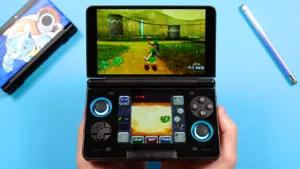
With the rise of dual screen handhelds, there’s a few emulators that have different options to allow dual screens at all.
Currently, the following emulators support dual screens:
- Azahar (official, see below)
- MelonDS (forked, see below)
- CEMU (forked, see below)
Azahar (Nintendo 3DS)
Setup the emulator following my setup guide for Azahar here.
Head to Settings > Layout > Landscape Screen Layout and set it to Single Screen.
Then, select Secondary Display Screen Layout and set it to Bottom Screen.
That’s it!
CEMU (Nintendo Wii U)
Setup the emulator following my setup guide for CEMU here.
Load into any game > Swipe up from the bottom for the back arrow or use your back gesture > Show pad enable & External PAD screen enable.
That’s it!
MelonDS (Nintendo DS)
Setup the emulator following my setup guide for MelonDS here.
Setting up the second screen
Settings > Video > Dual screen presets.
Internal: Top, External: Bottom is the correct option.
You can turn on Keep DS aspect ratio to keep the aspect ratio. I recommend this.
You can turn on Integer scale to integer scale. I personally use this.
For Fill area options, you can stretch either display horizontally or vertically.
For Vertical alignment, you can move either screen up or down or center.





That doesn’t address the issue.
The following settings simply aren’t there:
Settings > Video > Internal Screen Layout
Settings > Video > External display screen
Settings > Video > External screen layout
Also, the Layouts settings are now under Settings > Input, not Settings > Video.
The issue is now because of the Dual Screen presets, changing the Layouts doesn’t do anything, so there’s no making use of your suggested “top screen” layout, for example.
I’m using the MelonDS DS that downloaded from Obtainium using your joeys-obtainium-dual.json btw.
Any suggestions appreciated!
I installed the Melon DS fork 0.51 but when I open video settings on my thor it will only show me dual screen presets not the internal and external options. I have no idea why. Can you help?
See the Melonds section on this page.